Call for papers & review
Reviewers & the review process
Run a review round with the conductor — configure, assign, collect, decide.
Once submissions are in, you run peer review: reviewers score submissions against a rubric you control. The Reviews page walks you through the whole round.
The round conductor
Reviews opens with a four-step Review round stepper — Configure → Assign → Collect → Decide — showing each step's status (papers staffed, reviews in, decisions made) and highlighting the single Do next action. Each step links to the tool that does the work:
- Configure ("Set up round") — the review stage's own settings, blind mode and minimum reviews, under Reviews → Settings.
- Assign — the assignment matrix under Reviews → Assignments.
- Collect — chase outstanding reviews (also on Assignments).
- Decide — record decisions on the Decisions page.
The round list sits in the conductor card itself, under the four steps: create round 1, see each round's submission/review/decision stages, and start later rounds when one wraps up. There is no separate Stages page.
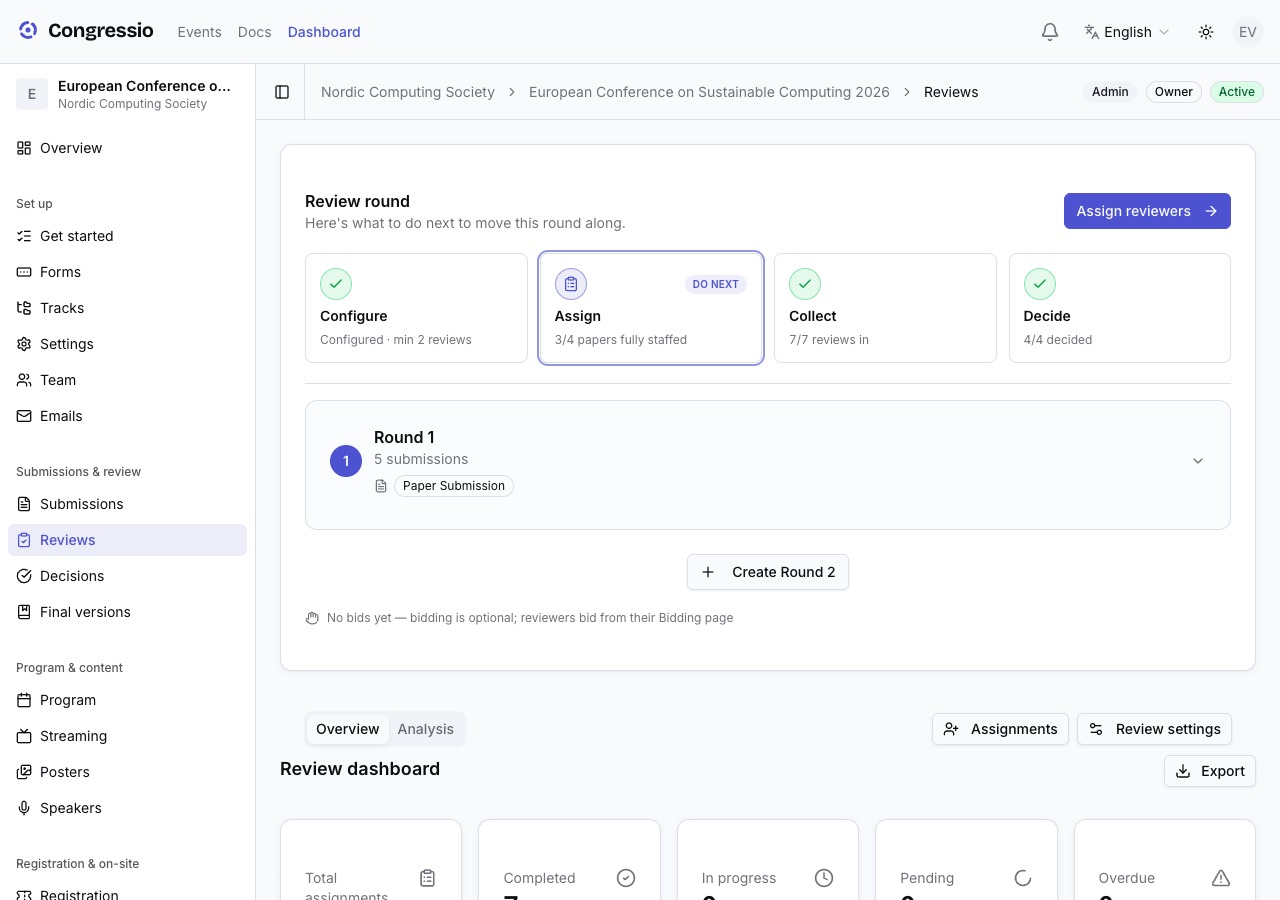
Once the round is configured, a line under the stepper shows how many reviewers have bid — bids are weighted into assignment (see below).
Rounds
A round isn't just a label on a set of reviews — a round owns submission forms. That is what makes a second round a real gate rather than a convention.
- A submission form can be bound to a round, and a round may own several forms (an abstract and a full paper on the same round, say).
- A form bound to a round stops being publicly listed. A round-2 form is reachable only by someone the committee let through.
- Round 1 and unbound forms are open to everybody. A single-round event never has to think about any of this: leave forms unbound and nothing is gated.
- Round N (N > 1) opens for an author only once they hold a finalized, advancing decision at round N − 1 — see Decisions for how a decision type is marked as advancing.
- Earlier rounds stay reachable. An author promoted to round 2 who also wants to put an unrelated abstract through round 1 can still do it.
Each form carries its own submission, review and decision cycle, so blind mode, minimum reviews and deadlines are set per form rather than once for the whole event.
Review settings
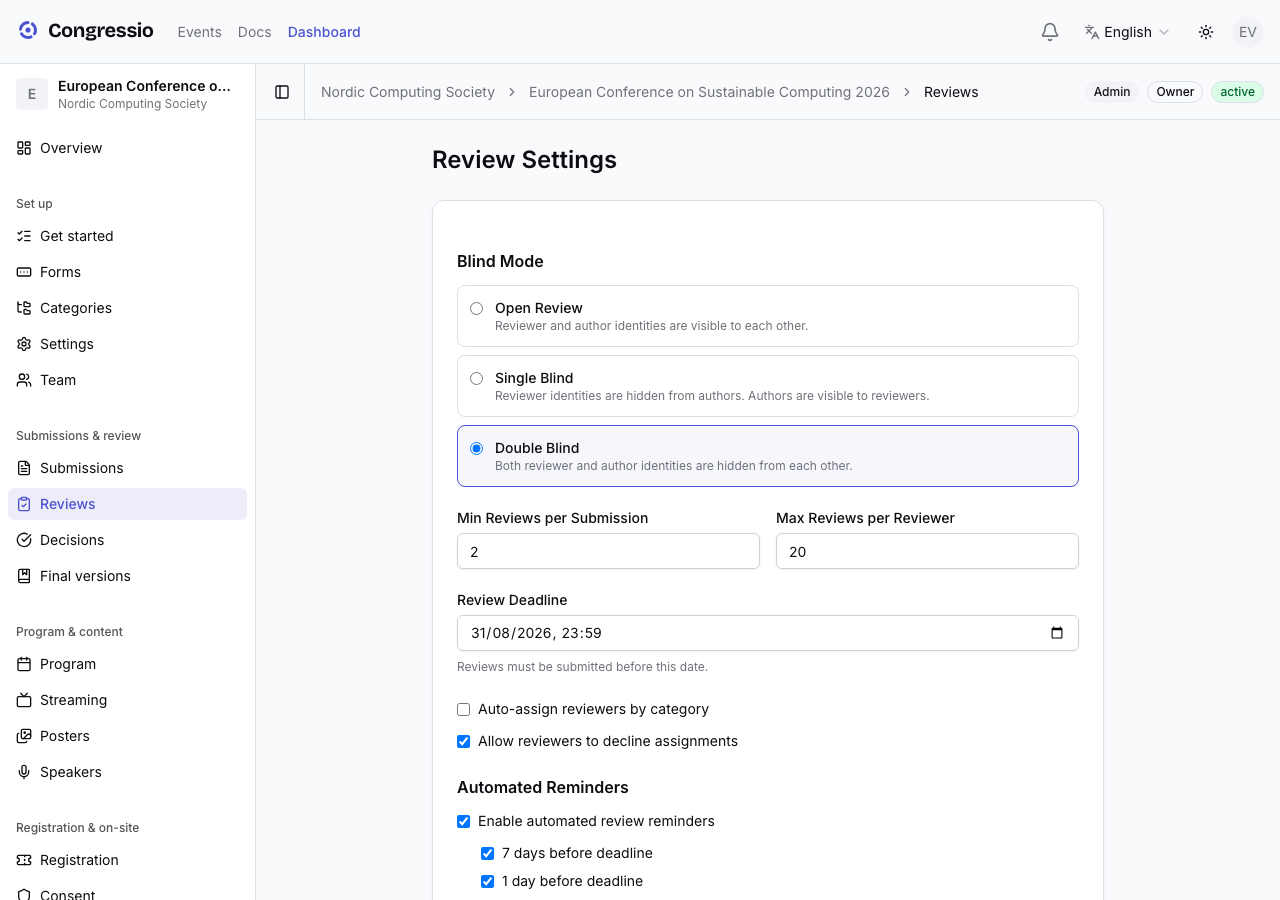
The round's settings live on the Review settings page (…/reviews/settings under your event dashboard):
- Blind mode — open, single-blind, or double-blind.
- Min reviews per submission (e.g. 3) and a max per reviewer.
- Auto-assign by track and whether reviewers may decline assignments.
- A review deadline and automated reminders (7 days / 1 day before, on the deadline, and after it).
- The rebuttal phase — open an author-response window with its own deadline.
- The stage status panel — open the round, and later close it. A closed round blocks reviewers from saving or submitting reviews; you can Reopen Review Stage at any time (e.g. closed too early, or a straggler needs to finish).
The review rubric is the review form (created automatically with your submission form) — edit it in the form builder. Its rating fields are the reviewer's score.
Add reviewers
Reviewer management lives on the Team page. Invite reviewers by email with the Reviewer role (they can join later via the invite link), or import a pasted list or an uploaded CSV/Excel file. For each reviewer you can set expertise tracks — matching and auto-assignment use them.
Reviewer bidding
Reviewers get a Bidding item in their sidebar (Reviews → Bidding). For each submission in the pool they bid Yes, Maybe, No, or Conflict:
- Bids are a strong signal in the assignment matrix, the AI matcher, and auto-assign — expertise first, then bids, then load balancing.
- A Conflict bid files a conflict-of-interest declaration and blocks that assignment outright.
Assign submissions
Under Reviews → Assignments you can:
- Auto-assign by track, expertise, bids and load, and confirm the preview.
- Assign manually with the assignment matrix — each cell shows the reviewer's bid.
- On a submission's detail page, the Reviewers panel has an AI suggest button for AI-ranked matches by topical fit (when AI is enabled).
Declared conflicts of interest are respected during assignment.
Collecting reviews
Reviewers work from their own Reviews queue and submit scores + comments (for the author, plus confidential notes for the committee). Reminders go out automatically per your reminder settings. Saving and submitting stop when the deadline passes or you close the round.
Need a reviewer to revise a submitted review — say, after an author's rebuttal? An admin can reopen an individual submitted review, unlocking it for that reviewer while everything else stays locked.
Deciding
Record decisions per submission or in batch on Decisions. Marking a decision final immediately emails its author a neutral notification linking to the site (the verdict is shown there, never in the email). Finalize all first shows a preview — how many decisions will flip to final, plus any under-reviewed submissions — then finalizes, emails only newly-finalized authors, and closes the stage. See Decisions.
Related: Decisions · Tracks · AI features